
Examples
Icons in one argument
Thousands of vendor icons and your own files, with icon="pack:name".
Adding an icon is one argument. No downloads to manage, no imports, no paths to configure:
d.box("Orders DB", icon="aws:rds")
d.box("Cluster", icon="gcp:gke")
d.box("Router", icon="network:router")
d.box("Our portal", icon="assets/acme.svg")     # any SVG or PNG, relative to the spec
The first time a diagram uses a pack, spinagram downloads it into ~/.cache/spinagram/icons. After that it
works offline.
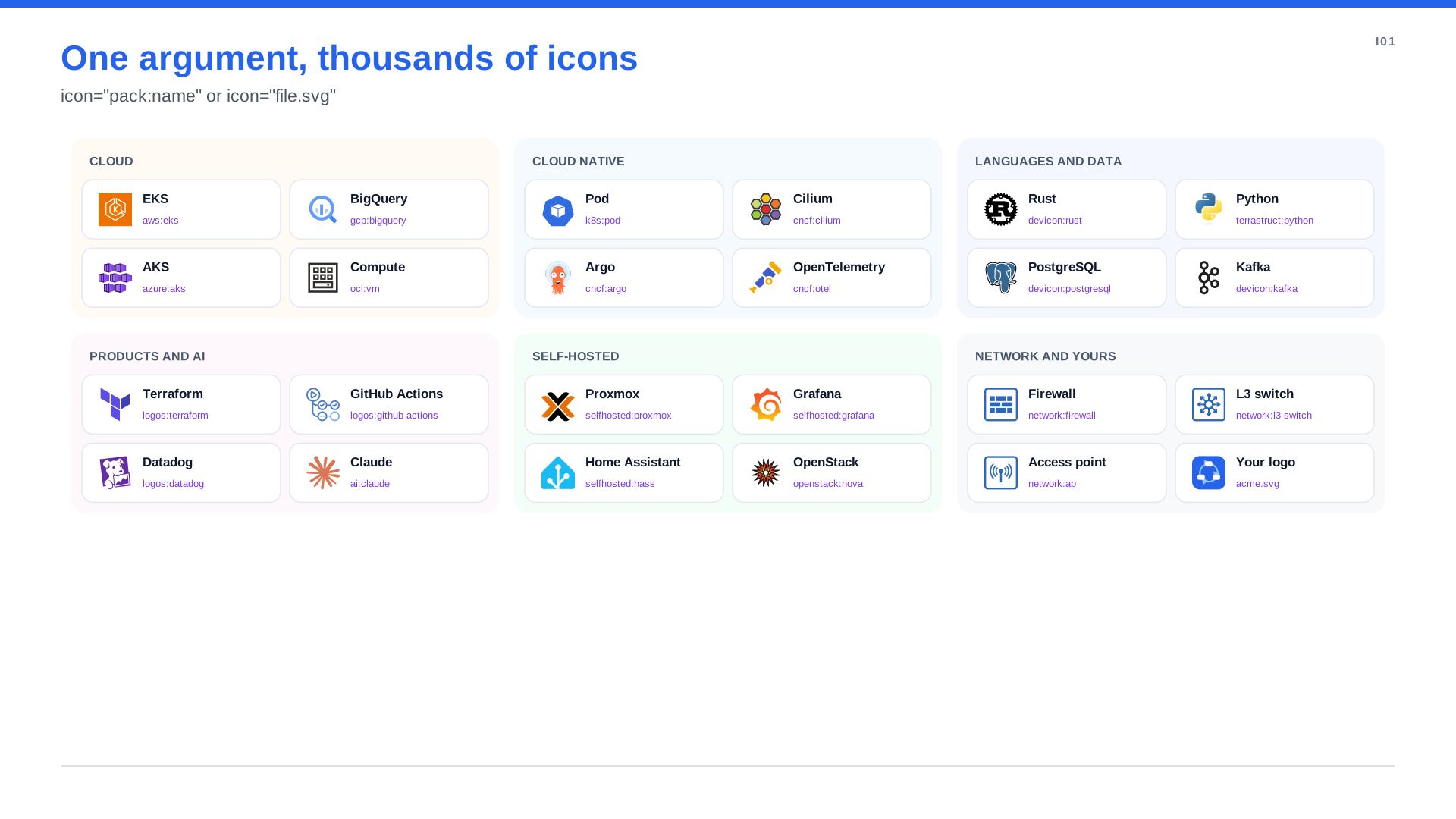
"""Icons from a dozen packs and a local file. An icon is just `icon="pack:name"` or a path next to the spec;
packs download on first use. Find names with `spinagram icons search <word>`."""
from spinagram import Diagram

d = Diagram("I01", "One argument, thousands of icons", subtitle='icon="pack:name" or icon="file.svg"',
            layout={"engine": "flex", "direction": "down", "gap": 24})
d.stylesheet("icons.css")

GROUPS = {
    "Cloud": [("EKS", "aws:eks"), ("BigQuery", "gcp:bigquery"), ("AKS", "azure:aks"), ("Compute", "oci:vm")],
    "Cloud native": [("Pod", "k8s:pod"), ("Cilium", "cncf:cilium"), ("Argo", "cncf:argo"),
                     ("OpenTelemetry", "cncf:otel")],
    "Languages and data": [("Rust", "devicon:rust"), ("Python", "terrastruct:python"),
                           ("PostgreSQL", "devicon:postgresql"), ("Kafka", "devicon:kafka")],
    "Products and AI": [("Terraform", "logos:terraform"), ("GitHub Actions", "logos:github-actions"),
                        ("Datadog", "logos:datadog"), ("Claude", "ai:claude")],
    "Self-hosted": [("Proxmox", "selfhosted:proxmox"), ("Grafana", "selfhosted:grafana"),
                    ("Home Assistant", "selfhosted:hass"), ("OpenStack", "openstack:nova")],
    "Network and yours": [("Firewall", "network:firewall"), ("L3 switch", "network:l3-switch"),
                          ("Access point", "network:ap"), ("Your logo", "acme.svg")],
}
with d.group(id="grid", class_="bare", columns=3, gap=20, padding=0, node_size=(262, 78)):
    for name, items in GROUPS.items():
        with d.group(name, class_=name.lower().replace(" ", "-"), columns=2, gap=12, padding=14):
            for title, icon in items:
                d.box(title, text=icon, icon=icon)
Find the name you need
spinagram icons search "load balancer"aws:elastic-load-balancing-application-load-balancer
aws:elastic-load-balancing-network-load-balancer
azure:load-balancers
…Short aliases work wherever they exist: aws:s3, aws:alb, aws:ec2, gcp:gke, azure:aks, network:fw,
selfhosted:pve. You can also browse every pack visually in spinagram serve under Icon packs.
What is in the box
| Pack | Icons | Good for |
|---|---|---|
aws | 800+ | AWS services and groups |
gcp | 200+ | Google Cloud |
azure | 600+ | Azure |
k8s | 70+ | Kubernetes objects and control plane |
oci, openstack | 120+ | Oracle Cloud, OpenStack |
terrastruct | 1,200 | Languages, databases, frameworks, generic infrastructure |
selfhosted | 3,200+ | Self-hosted and homelab software logos |
network | 550 | Routers, switches, firewalls, access points in four colours |
cncf | 240 | CNCF projects: Cilium, Argo, Envoy, OpenTelemetry, Falco, Kyverno, KEDA, Flux… |
logos | 2,000 | Technology logos: Terraform, GitHub Actions, Datadog, GitLab, JFrog… (-logo for the full logo) |
ai | 950 | AI providers, models, agents and frameworks: OpenAI, Claude, Gemini, Ollama, MCP… |
devicon | 560 | Languages, frameworks and tools in their original colours |
Icons that adapt
- Dark fills. Where a pack has light artwork for an icon, spinagram uses it automatically on dark boxes.
- Legends.
d.add_legend({"aws:sqs": "Async messaging"})uses the icon itself as the swatch. - Categories. A diagram full of
aws:icons is taggedawsand filed under AWS in the catalog, with no metadata to write. - Everywhere. Icons stay vectors in SVG, PowerPoint and Figma.
Bring your own
A single file is just a path. For a whole set (your company's product icons, say), register a folder, an npm package or a GitHub repository as a pack and reference it like the built-in ones:
spinagram icons add acme --dir ./brand/icons          # then icon="acme:portal"
spinagram icons add acme --github acme/brand-icons   # or --npm, --zip
Details, aliases and the full pack list: Icon packs.