
Tutorial: your first diagram
From an empty file to a styled, annotated PowerPoint slide in seven steps.
In this tutorial you draw the checkout system of an online shop. You start with four boxes and,
one small change at a time, end with a slide you could present: icons, AWS zones, numbered steps,
a legend and your own colours. Every step is a complete file in
examples/tutorial/, and every
picture below is what that file renders.
Install spinagram
You need Python 3.11 or newer.
pip install "spinagram[all]" # or: uv add "spinagram[all]"[all] brings PowerPoint output and the live preview. pip install spinagram alone renders SVG and PNG.
spinagram's engine is written in Rust and compiled into the wheels for Linux, macOS and Windows (x86_64 and arm64). On any other platform pip builds it from source, which needs a Rust toolchain.
Say what talks to what
Create checkout.py. A Diagram has an id and a title; d.box() adds a box and >> draws an arrow.
"""Tutorial step 1: boxes and arrows. `spinagram serve examples/tutorial/step1_boxes.py`."""
from spinagram import Diagram

d = Diagram("T01", "Checkout", subtitle="Step 1: say what talks to what")

shoppers = d.box("Shoppers")
store = d.box("Storefront")
orders = d.box("Orders API")
db = d.box("Orders DB")

shoppers >> store >> orders >> db
Open a live preview. It re-renders every time you save, so keep it open for the rest of the tutorial:
spinagram serve checkout.py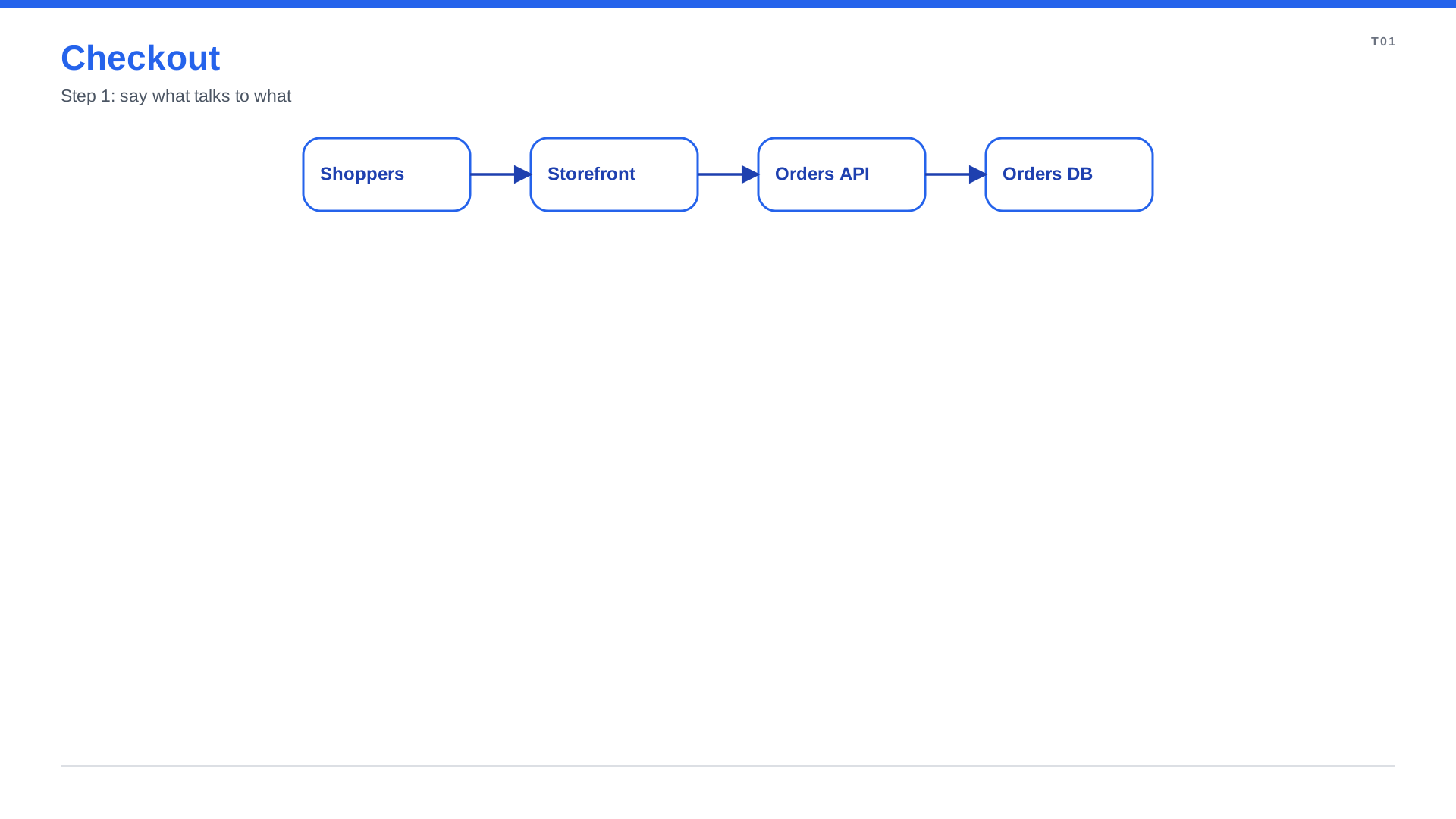
You gave no sizes and no positions. spinagram sized each box from its title and laid them out left to right.
No boilerplate
There is nothing to register: spinagram serve and spinagram render pick up every Diagram the file creates.
Add detail, icons and labels
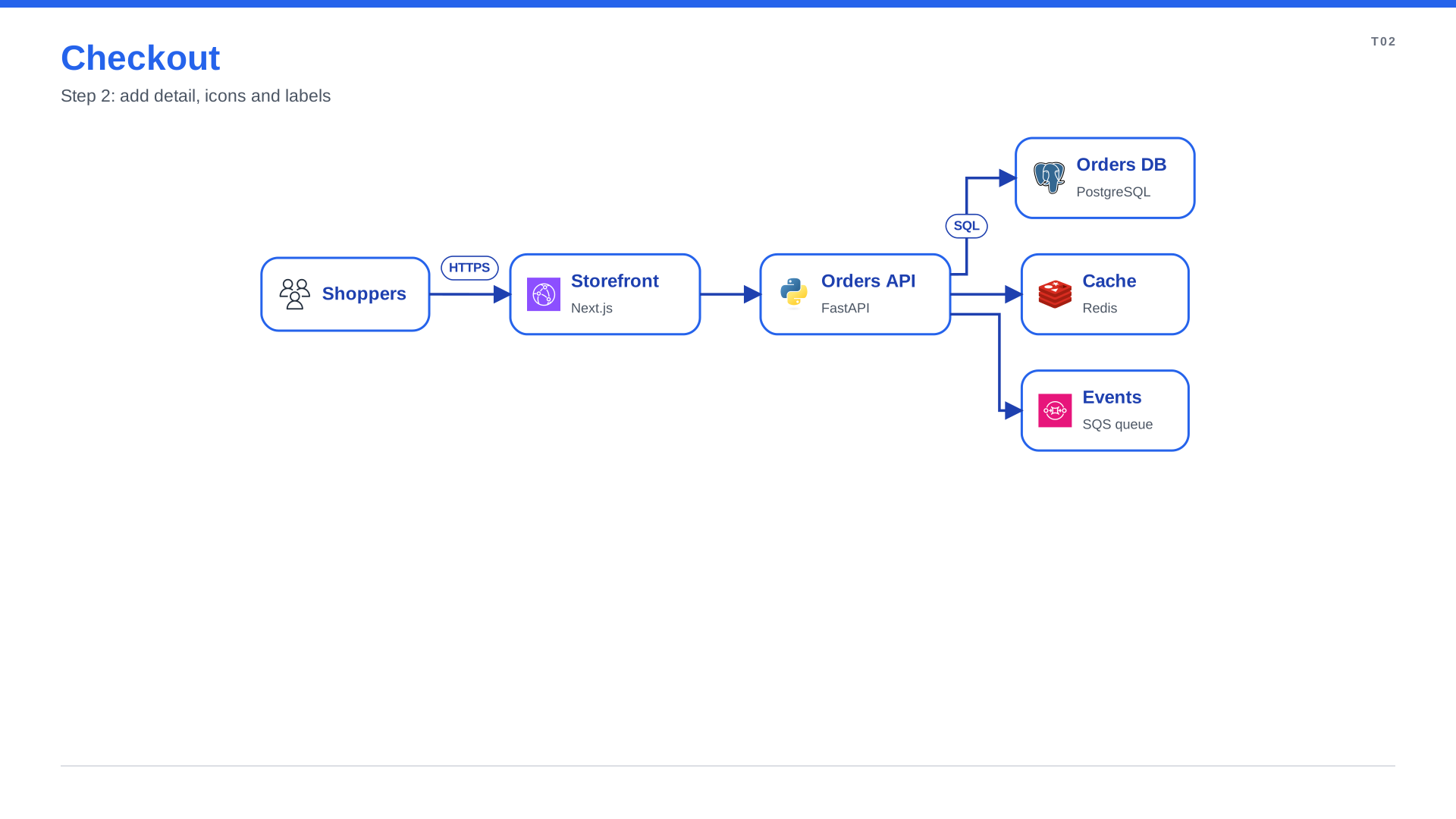
Give boxes a second line with text=, an icon with icon="pack:name", and label an arrow with .to().
A list after >> fans out to several boxes at once.
"""Tutorial step 2: body text, icons, labelled arrows and fan-out."""
from spinagram import Diagram

d = Diagram("T02", "Checkout", subtitle="Step 2: add detail, icons and labels",
            layout={"engine": "layered", "direction": "right"})

shoppers = d.box("Shoppers", icon="aws:users")
store = d.box("Storefront", text="Next.js", icon="aws:cloudfront")
orders = d.box("Orders API", text="FastAPI", icon="terrastruct:python")
db = d.box("Orders DB", text="PostgreSQL", icon="terrastruct:postgres")
cache = d.box("Cache", text="Redis", icon="terrastruct:redis")
queue = d.box("Events", text="SQS queue", icon="aws:sqs")

shoppers.to(store, "HTTPS") >> orders
orders.to(db, "SQL")
orders >> [cache, queue]
Icon packs (AWS, Google Cloud, Azure, Kubernetes and more) download the first time you use them.
Find an icon with spinagram icons search queue. The layered layout engine puts the three stores in one
column because they are the same distance from the shoppers.
Group what belongs together
Wrap boxes in with d.group(...) blocks. Groups nest, and AWS styles draw the familiar Region and VPC frames.
"""Tutorial step 3: groups nest boxes into zones; the layout wraps them for you."""
from spinagram import Diagram

d = Diagram("T03", "Checkout", subtitle="Step 3: group what belongs together")

shoppers = d.box("Shoppers", icon="aws:users")
with d.group("AWS eu-west-1", style="aws-region", direction="right"):
    store = d.box("Storefront", text="CloudFront", icon="aws:cloudfront")
    with d.group("VPC", style="aws-vpc", direction="right"):
        orders = d.box("Orders API", text="FastAPI on ECS", icon="terrastruct:python")
        with d.group("Data"):
            db = d.box("Orders DB", text="PostgreSQL", icon="terrastruct:postgres")
            cache = d.box("Cache", text="Redis", icon="terrastruct:redis")
            queue = d.box("Events", text="SQS queue", icon="aws:sqs")

shoppers.to(store, "HTTPS") >> orders
orders.to(db, "SQL")
orders >> [cache, queue]
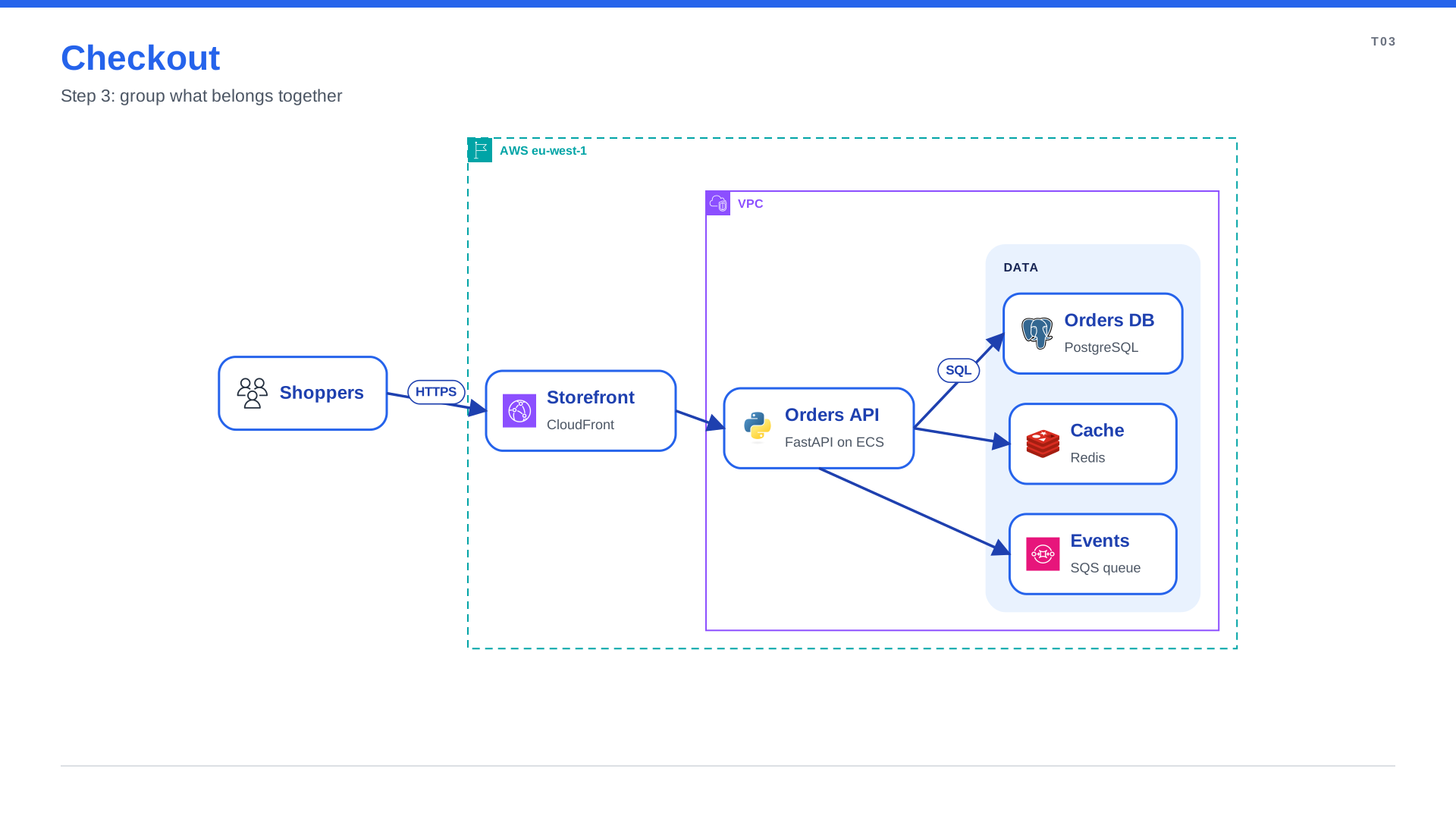
The diagram grew a level of structure and you still have not placed anything. Move a box to another group and the layout follows.
Explain it on the slide
A diagram that only makes sense while you talk over it fails the moment it is shared. Add step= to
arrows to number the flow, d.callout() to point at what matters, and d.add_legend() to decode icons and colours.
"""Tutorial step 4: numbered steps, a callout and a legend explain the diagram on the slide."""
from spinagram import Diagram

d = Diagram("T04", "Checkout", subtitle="Step 4: explain it with steps, callouts and a legend")

shoppers = d.box("Shoppers", icon="aws:users")
with d.group("AWS eu-west-1", style="aws-region", direction="right"):
    store = d.box("Storefront", text="CloudFront", icon="aws:cloudfront")
    with d.group("VPC", style="aws-vpc", direction="right"):
        orders = d.box("Orders API", text="FastAPI on ECS", icon="terrastruct:python")
        with d.group("Data"):
            db = d.box("Orders DB", text="PostgreSQL", icon="terrastruct:postgres")
            cache = d.box("Cache", text="Redis", icon="terrastruct:redis")
            queue = d.box("Events", text="SQS queue", icon="aws:sqs")

shoppers.to(store, "HTTPS", step="Shopper opens the cart")
store.to(orders, step="Storefront posts the order")
orders.to(db, "SQL", step="Order is stored")
orders >> cache
orders.to(queue, step="Fulfilment is notified")

d.callout(shoppers, "40k checkouts an hour on sale days", title="Peak load", kind="warning", side="bottom")
d.add_legend({"aws:users": "People", "terrastruct:python": "Service", "aws:sqs": "Async messaging"})
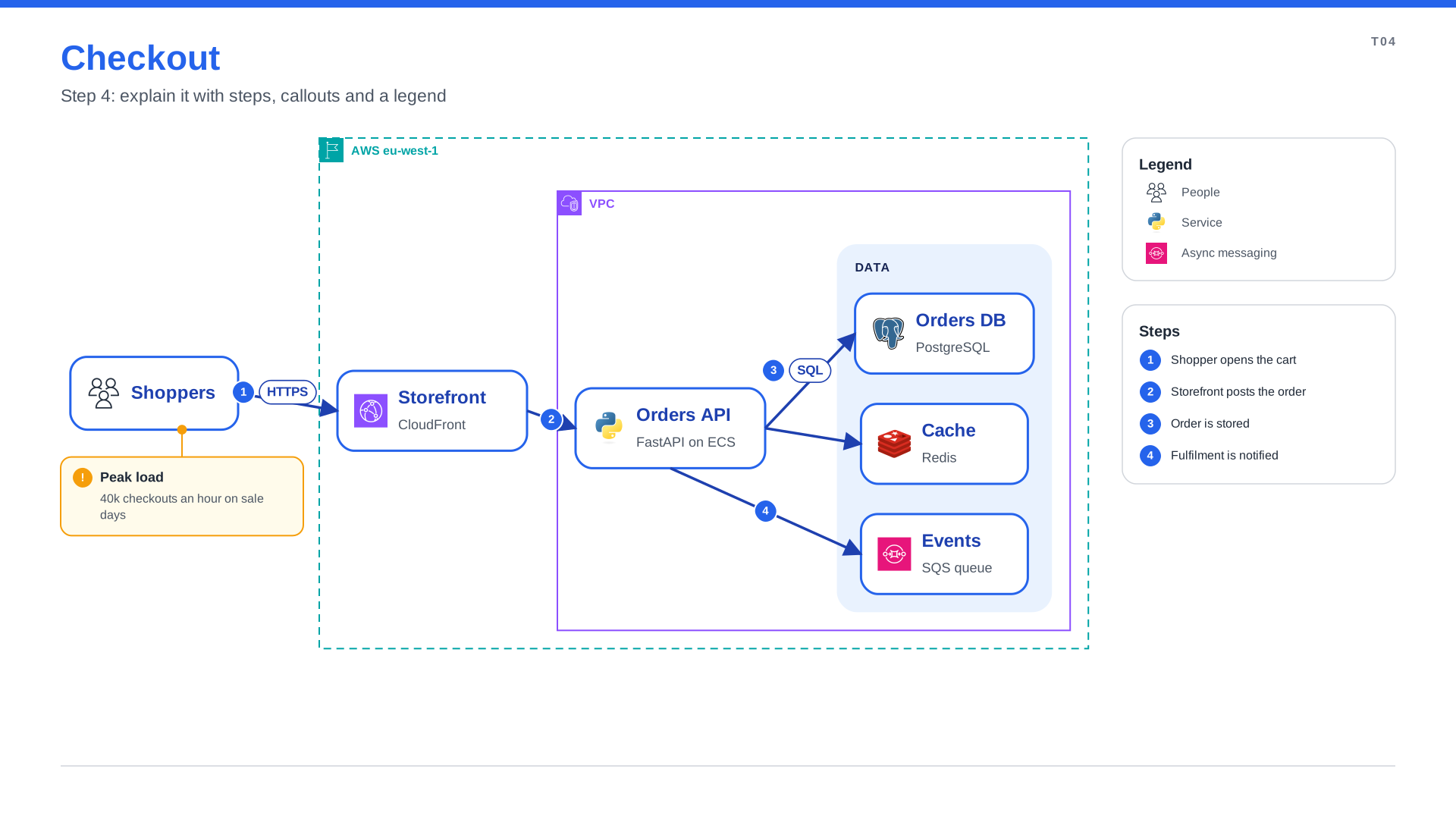
spinagram reserves a band on the right for the legend and the steps panel, so they never cover the diagram, and finds a free side for the callout.
Make it yours with CSS
Tag elements with class_= and describe the look in a stylesheet. The diagram code stays about what,
the stylesheet about how it looks, and one stylesheet can restyle a whole deck.
/* Tutorial step 5: one stylesheet restyles the diagram without touching its code. */
:root { --brand: #6D28D9; }

node { border-radius: 12px; box-shadow: 0 4px 10px rgba(15, 23, 42, 0.12); }
node::title { color: var(--brand); }
node.external { fill: #F5F3FF; stroke-dasharray: 8 5; }
node.critical { fill: #FEE2E2; stroke: #DC2626; stroke-width: 4; }
node.critical::title { color: #7F1D1D; }

edge { stroke: #475569; }
edge.async { stroke: #F59E0B; stroke-dasharray: 6 4; marker-end: open-arrow; }
"""Tutorial step 5: classes and a stylesheet give the diagram your brand."""
from spinagram import Diagram

d = Diagram("T05", "Checkout", subtitle="Step 5: style it with CSS")
d.stylesheet("checkout.css")

shoppers = d.box("Shoppers", icon="aws:users", class_="external")
with d.group("AWS eu-west-1", style="aws-region", direction="right"):
    store = d.box("Storefront", text="CloudFront", icon="aws:cloudfront")
    with d.group("VPC", style="aws-vpc", direction="right"):
        orders = d.box("Orders API", text="FastAPI on ECS", icon="terrastruct:python", class_="critical")
        with d.group("Data", gap=24):
            db = d.box("Orders DB", text="PostgreSQL", icon="terrastruct:postgres")
            cache = d.box("Cache", text="Redis", icon="terrastruct:redis")
            queue = d.box("Events", text="SQS queue", icon="aws:sqs")

shoppers.to(store, "HTTPS") >> orders
orders.to(db, "SQL")
orders >> cache
orders.to(queue, "order.placed", class_="async")

d.add_legend({".external": "Outside our account", ".critical": "Revenue critical",
              "edge.async": "Async event"}, position="bottom")

if __name__ == "__main__":
    d.save("out/", formats=["svg", "png", "pptx"])
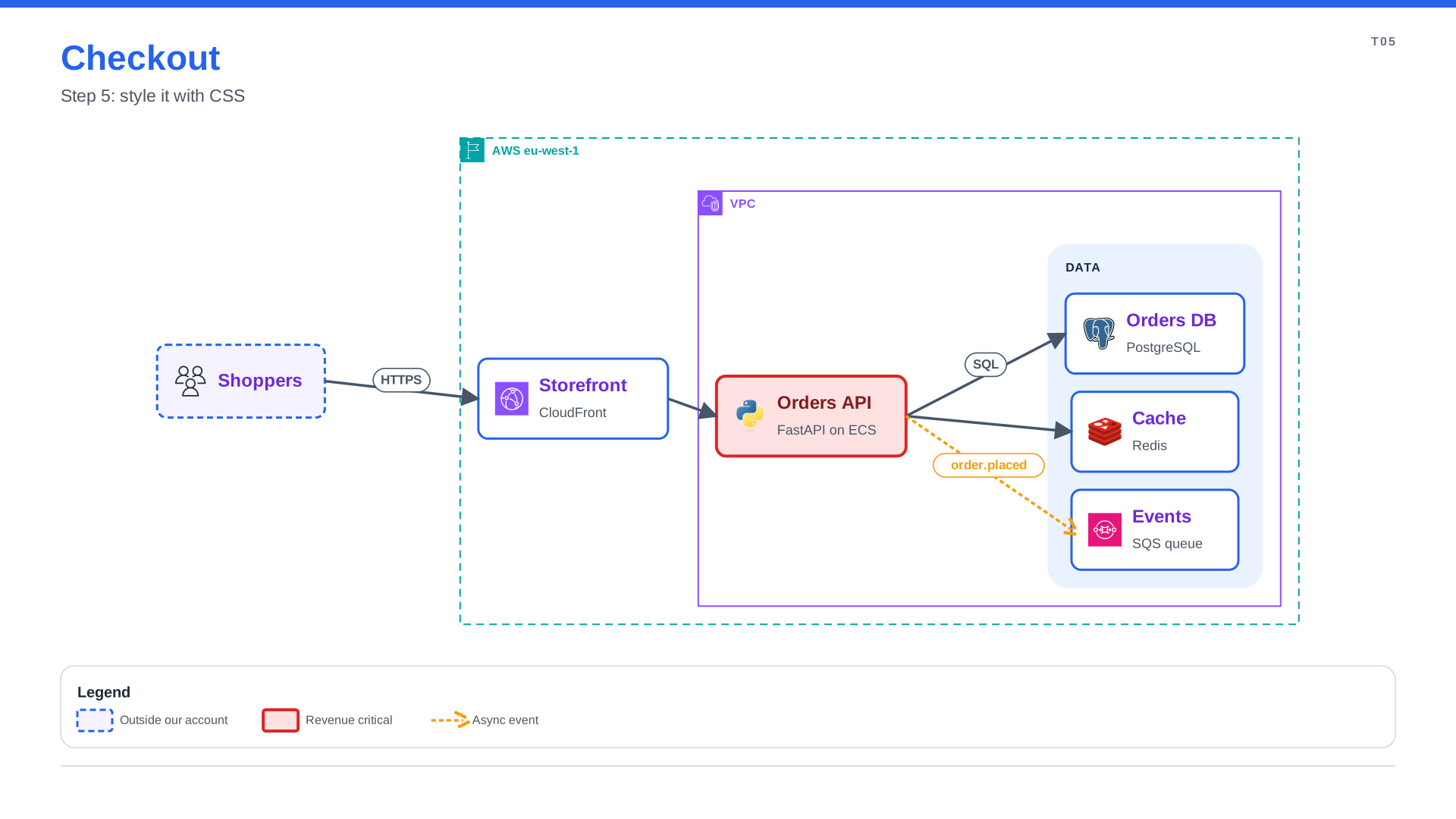
The legend now lists your classes, named after what they mean. Not sure why a box looks the way it does?
Press Inspect in the live preview and click it, or run spinagram check --styles checkout.py.
Check it and share it
Before you share, let spinagram review the diagram for text that does not fit, overlaps and unused styles:
spinagram check checkout.pyThen render the formats your audience uses:
spinagram render checkout.py -f svg,png,pptx -o out/| You get | Use it for |
|---|---|
out/T05-checkout.svg | Docs, wikis, READMEs. Fonts and icons are embedded |
out/T05-checkout.png | Chat, email, tickets |
out/diagrams.pptx | Slide decks. Real shapes and bound connectors, so colleagues can edit it in PowerPoint |
-f figma / -f figjam | Editable Figma frames or a FigJam board, see Figma and FigJam |
You just learned
d.box(),>>,.to(target, "label")and fan-out lists describe the system.with d.group()adds structure; the layout does the placing.step=,d.callout()andd.add_legend()make the diagram explain itself.- A stylesheet and
class_=give it your brand. spinagram serve,checkandrenderare the loop: preview, review, ship.