
Stylish diagrams with CSS
One diagram, four looks. Only the stylesheet changes.
The four slides on this page are the same Python code. Each one attaches a different stylesheet. The
diagram says what each element is (class_="service", class_="store", class_="async"); the stylesheet
decides what that looks like. Rebrand a whole deck by swapping one file.
The diagram
Classes name a role, never a colour. The legend is generated from those names, so it restyles itself too.
"""The diagram every look in this folder restyles: the code only says what each element *is*."""
from spinagram import Diagram


def platform(id: str, title: str, sheet: str) -> Diagram:
    d = Diagram(id, title, subtitle=f"The same diagram, styled by {sheet}",
                layout={"engine": "layered", "direction": "right", "rank_gap": 64, "route": "ortho"})
    d.stylesheet(sheet)
    with d.group("Event-driven shop", id="canvas", class_="canvas", direction="right"):
        with d.group("Clients", id="clients", class_="tier"):
            web = d.box("Web app", text="React", icon="terrastruct:react", class_="client")
            mobile = d.box("Mobile", text="iOS, Android", icon="selfhosted:android", class_="client")
        gateway = d.box("API gateway", text="auth, rate limits", icon="aws:api-gateway", class_="edge")
        with d.group("Services", id="services", class_="tier"):
            users = d.box("Accounts", text="Go", icon="terrastruct:go", class_="service")
            orders = d.box("Orders", text="Python", icon="terrastruct:python", class_="service hero")
            search = d.box("Search", text="Elasticsearch", icon="selfhosted:elasticsearch", class_="service")
        with d.group("Data", id="data", class_="tier"):
            db = d.box("Orders DB", text="PostgreSQL", icon="terrastruct:postgres", class_="store")
            bus = d.box("Event bus", text="Kafka on MSK", icon="aws:amazon-managed-streamingfor-apache-kafka", class_="stream")
    web >> gateway
    mobile >> gateway
    gateway >> [orders, users, search]
    orders.to(db, "SQL")
    orders.to(bus, "order.placed", class_="async")
    bus.to(search, "reindex", class_="async")
    d.add_legend({".client": "Client", ".service": "Service", ".store": "Data store", ".stream": "Event stream",
                  ".hero": "Revenue critical",
                  "edge.async": "Async event"}, position="bottom")
    return d
"""One diagram, four looks: `spinagram serve examples/looks/` and compare. Only the stylesheet changes."""
from _platform import platform

diagrams = [
    platform("LOOK01", "Midnight", "midnight.css"),
    platform("LOOK02", "Blueprint", "blueprint.css"),
    platform("LOOK03", "Pastel", "pastel.css"),
    platform("LOOK04", "Editorial", "editorial.css"),
]
Midnight
A dark canvas group, glass cards with deep shadows, and a neon outline per role. The hero service glows
with a box-shadow that has no offset.
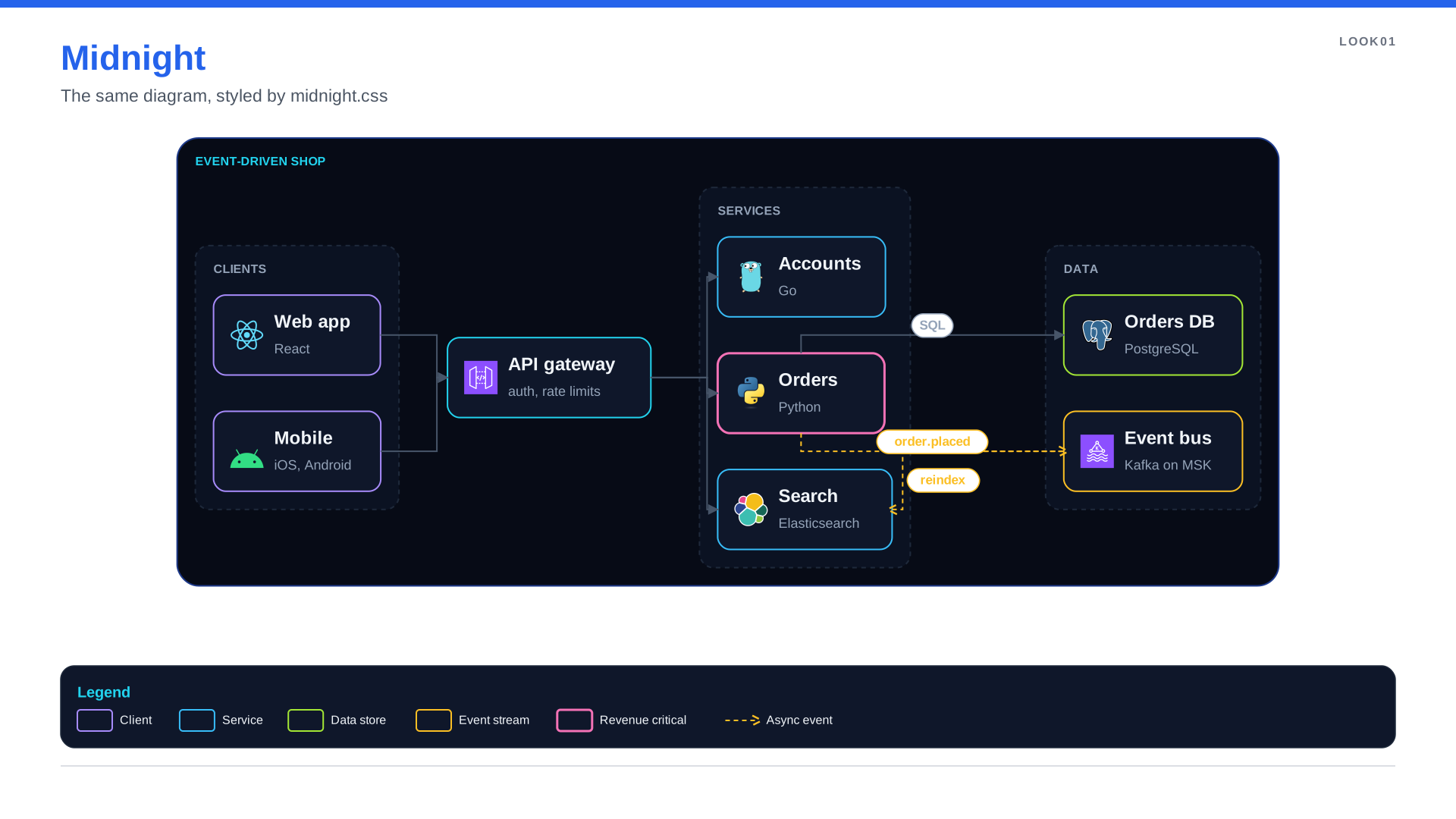
/* Midnight: a dark canvas, glass cards and neon accents per role. */
:root { --night: #070B16; --panel: #0F172A; --rim: #1E293B; --text: #F1F5F9; --mute: #94A3B8;
        --cyan: #22D3EE; --violet: #A78BFA; --pink: #F472B6; --lime: #A3E635; --amber: #FBBF24; }

group.canvas        { fill-opacity: 1; opacity: 1; fill: var(--night); stroke: #1E3A8A; stroke-width: 2; border-radius: 28px;
                      box-shadow: 0 24px 48px rgba(2, 6, 23, 0.45); }
group.canvas::label { color: var(--cyan); font-size: 16px; }
group.tier          { opacity: 1; fill-opacity: 1; fill: #0B1222; stroke: var(--rim); stroke-dasharray: 6 6; border-radius: 18px; }
group.tier::label   { color: var(--mute); }

node                { fill: var(--panel); stroke: var(--rim); stroke-width: 2; border-radius: 16px;
                      box-shadow: 0 10px 24px rgba(0, 0, 0, 0.55); }
node::title         { color: var(--text); font-weight: 600; }
node::body          { color: var(--mute); }
node.client         { stroke: var(--violet); }
node.edge           { stroke: var(--cyan); box-shadow: 0 0 26px rgba(34, 211, 238, 0.45); }
node.service        { stroke: #38BDF8; }
node.hero           { stroke: var(--pink); stroke-width: 3; box-shadow: 0 0 32px rgba(244, 114, 182, 0.55); }
node.store          { stroke: var(--lime); }
node.stream         { stroke: var(--amber); }

edge                { stroke: #475569; stroke-width: 2; }
edge::label         { color: var(--mute); }
edge.async          { stroke: var(--amber); stroke-dasharray: 6 5; marker-end: open-arrow; }
edge.async::label   { color: var(--amber); }

legend              { fill: var(--panel); stroke: var(--rim); }
legend::title       { color: var(--cyan); }
legend::body        { color: var(--text); }
Blueprint
Square corners, white ink, dashed construction lines for data, and open arrowheads.
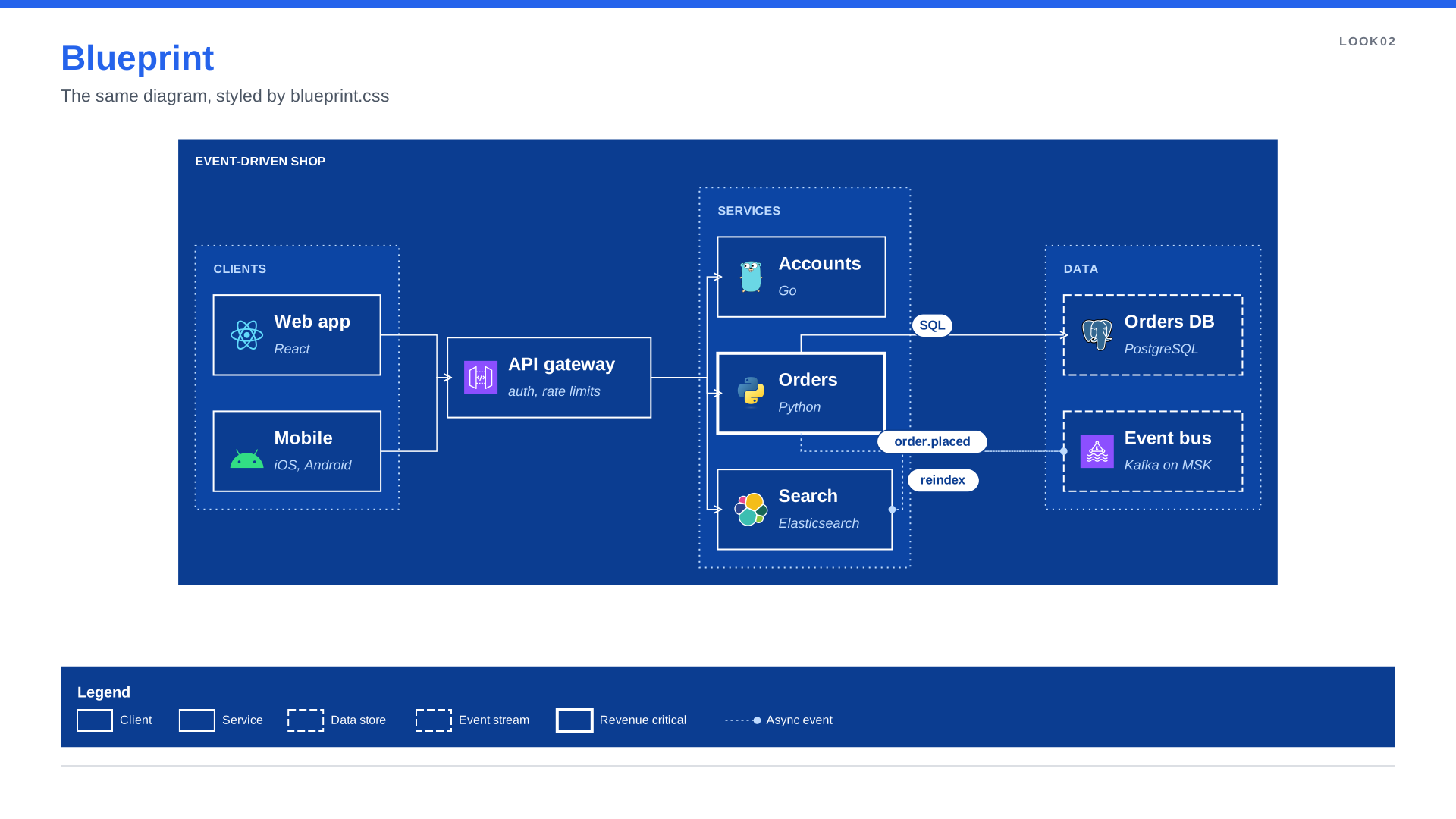
/* Blueprint: white ink on drafting blue, square corners and dashed construction lines. */
:root { --paper: #0B3D91; --ink: #FFFFFF; --faint: #BFDBFE; }

group.canvas        { fill-opacity: 1; opacity: 1; fill: var(--paper); stroke: var(--ink); stroke-width: 3; border-radius: 0; }
group.canvas::label { color: var(--ink); font-weight: 700; }
group.tier          { opacity: 1; fill: #0E4BB0; fill-opacity: 0.6; stroke: var(--faint); stroke-dasharray: 2 6; border-radius: 0; }
group.tier::label   { color: var(--faint); }

node                { fill: var(--paper); stroke: var(--ink); stroke-width: 2; border-radius: 0; box-shadow: none; }
node::title         { color: var(--ink); font-weight: 700; }
node::body          { color: var(--faint); font-style: italic; }
node.hero           { stroke-width: 4; }
node.store, node.stream { stroke-dasharray: 10 4; }

edge                { stroke: var(--ink); stroke-width: 1.5; marker-end: open-arrow; }
edge::label         { color: var(--paper); }  /* label pills keep the white canvas fill */
edge.async          { stroke: var(--faint); stroke-dasharray: 3 4; marker-end: circle; }

legend              { fill: var(--paper); stroke: var(--ink); border-radius: 0; }
legend::title, legend::body { color: var(--ink); }
Pastel
No outlines: tinted fills per role, round corners and soft shadows. Good for product docs and onboarding.
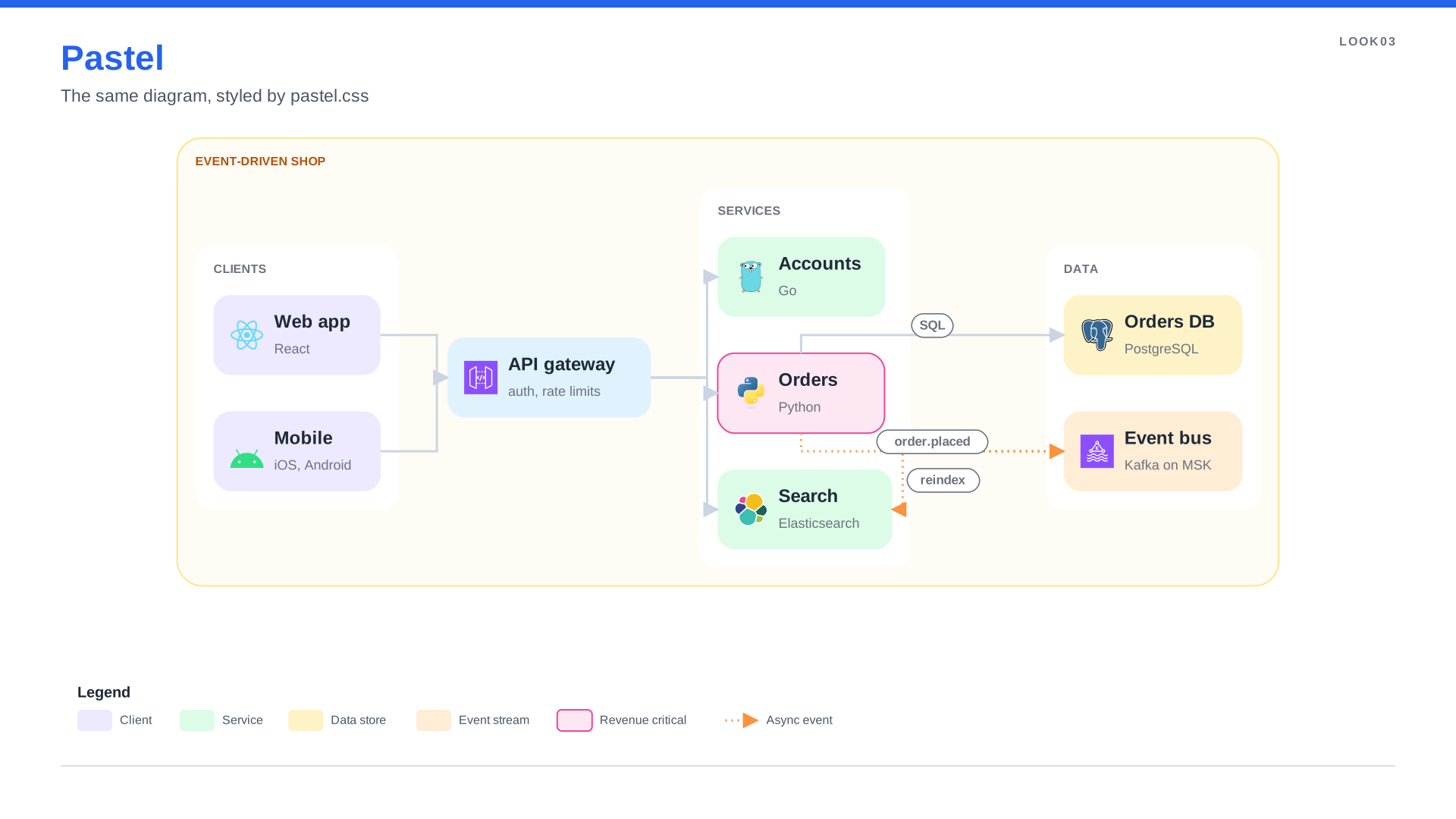
/* Pastel: soft tinted cards, round corners, gentle shadows. Friendly for product and onboarding docs. */
:root { --ink: #1F2937; --mute: #6B7280; }

group.canvas        { fill-opacity: 1; opacity: 1; fill: #FFFBF5; stroke: #FDE68A; stroke-width: 2; border-radius: 32px; }
group.canvas::label { color: #B45309; }
group.tier          { opacity: 1; fill-opacity: 1; fill: #FFFFFF; stroke-width: 0; border-radius: 24px; box-shadow: 0 8px 22px rgba(180, 83, 9, 0.08); }
group.tier::label   { color: var(--mute); }

node                { stroke-width: 0; border-radius: 22px; box-shadow: 0 6px 14px rgba(31, 41, 55, 0.10); }
node::title         { color: var(--ink); font-weight: 600; }
node::body          { color: var(--mute); }
node.client         { fill: #EDE9FE; }
node.edge           { fill: #E0F2FE; }
node.service        { fill: #DCFCE7; }
node.hero           { fill: #FCE7F3; stroke: #EC4899; stroke-width: 2; }
node.store          { fill: #FEF3C7; }
node.stream         { fill: #FFEDD5; }

edge                { stroke: #CBD5E1; stroke-width: 3; }
edge::label         { color: var(--mute); }
edge.async          { stroke: #FB923C; stroke-dasharray: 2 6; }

legend              { fill: #FFFFFF; stroke-width: 0; box-shadow: 0 8px 22px rgba(31, 41, 55, 0.08); }
Editorial
Black and white for print, with one red accent for the revenue-critical path.
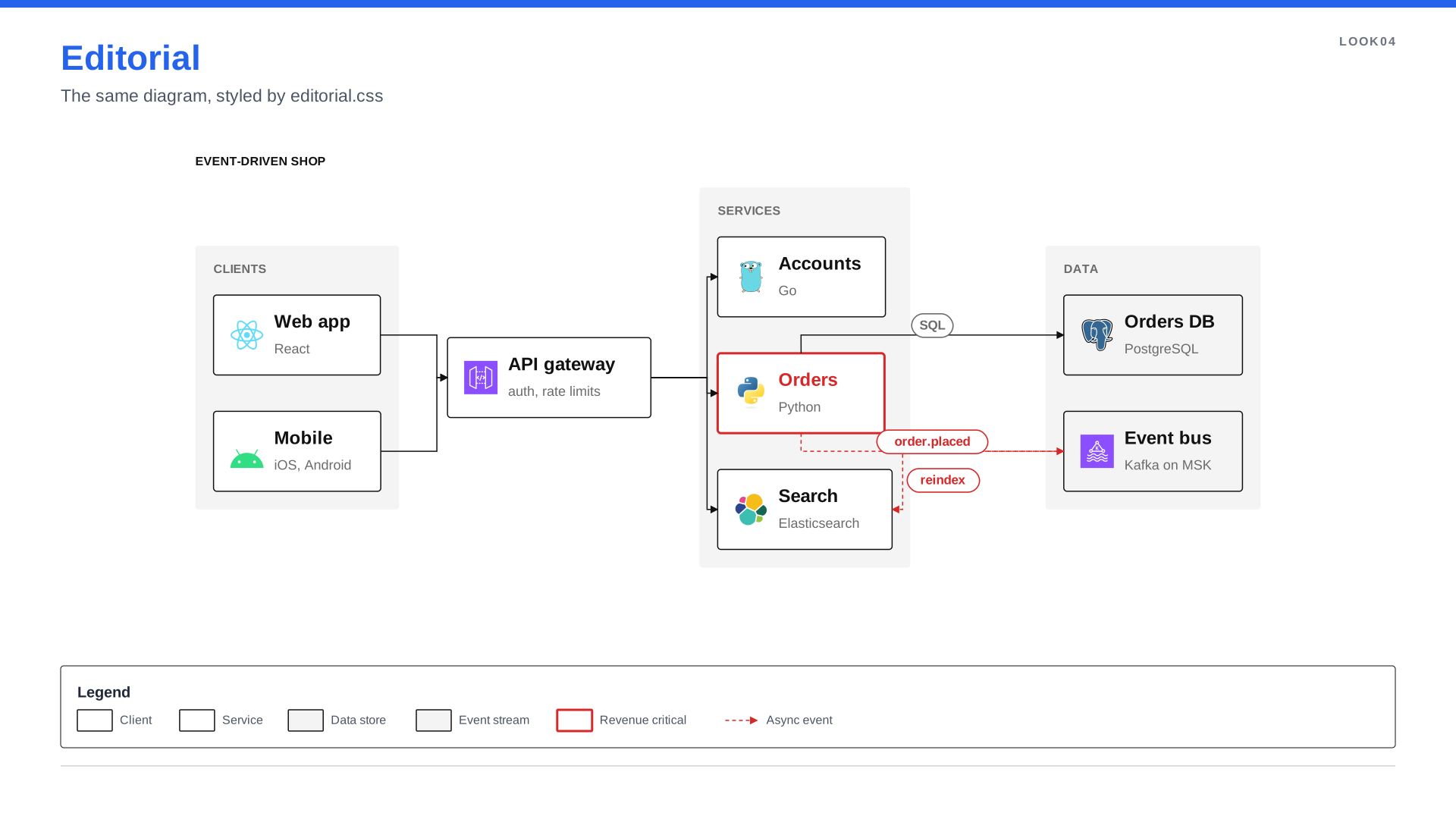
/* Editorial: black and white for print, one red accent for what matters. */
:root { --ink: #111111; --grey: #6B6B6B; --accent: #D62828; }

group.canvas        { fill-opacity: 1; opacity: 1; fill: #FFFFFF; stroke-width: 0; }
group.canvas::label { color: var(--ink); font-weight: 700; }
group.tier          { opacity: 1; fill-opacity: 1; fill: #F4F4F4; stroke-width: 0; border-radius: 4px; }
group.tier::label   { color: var(--grey); }

node                { fill: #FFFFFF; stroke: var(--ink); stroke-width: 1.5; border-radius: 4px; box-shadow: none; }
node::title         { color: var(--ink); font-weight: 700; }
node::body          { color: var(--grey); }
node.hero           { stroke: var(--accent); stroke-width: 3; }
node.hero::title    { color: var(--accent); }
node.store, node.stream { fill: #F4F4F4; }

edge                { stroke: var(--ink); stroke-width: 1.5; }
edge::label         { color: var(--grey); font-style: italic; }
edge.async          { stroke: var(--accent); stroke-dasharray: 5 4; }
edge.async::label   { color: var(--accent); }

legend              { fill: #FFFFFF; stroke: var(--ink); stroke-width: 1; border-radius: 4px; box-shadow: none; }
Techniques worth stealing
| Effect | CSS |
|---|---|
| Dark canvas | Wrap the diagram in a group and style it: group.canvas { fill: #070B16; fill-opacity: 1 } |
| Glow | A shadow with no offset: box-shadow: 0 0 32px rgba(244, 114, 182, 0.55) |
| Lifted card | A soft offset shadow: box-shadow: 0 6px 14px rgba(15, 23, 42, 0.10) |
| Layout-only group | Hide it: group.bare { fill-opacity: 0; stroke-width: 0 } |
| Async events | edge.async { stroke-dasharray: 6 5; marker-end: open-arrow } |
| One palette | Custom properties: :root { --brand: #6D28D9 }, then stroke: var(--brand) |
| Style by context | group.cluster node::title { color: #F8FAFC } |
Edge label pills always use the canvas colour (white by default), so give labels a dark color even on a
dark canvas, as Blueprint does.
Work on a look live
spinagram serve examples/looks/Edit a .css file and every diagram that uses it re-renders. Press Inspect (or i) and click an element
to see which rule set each value, or ask on the command line:
spinagram check examples/looks/ --styles --select ".hero"Every property and how SVG, PowerPoint and Figma draw it: CSS styling · CSS by backend.