
Behavior diagrams
Flowcharts, state machines and activity diagrams, alone or inside any diagram.
Three builders add the symbols and verbs of behavior diagrams. Each is a Diagram (use it on its
own) and defaults to the built-in layered engine, which ranks nodes along the flow, routes edges
orthogonally and draws loops round the side.
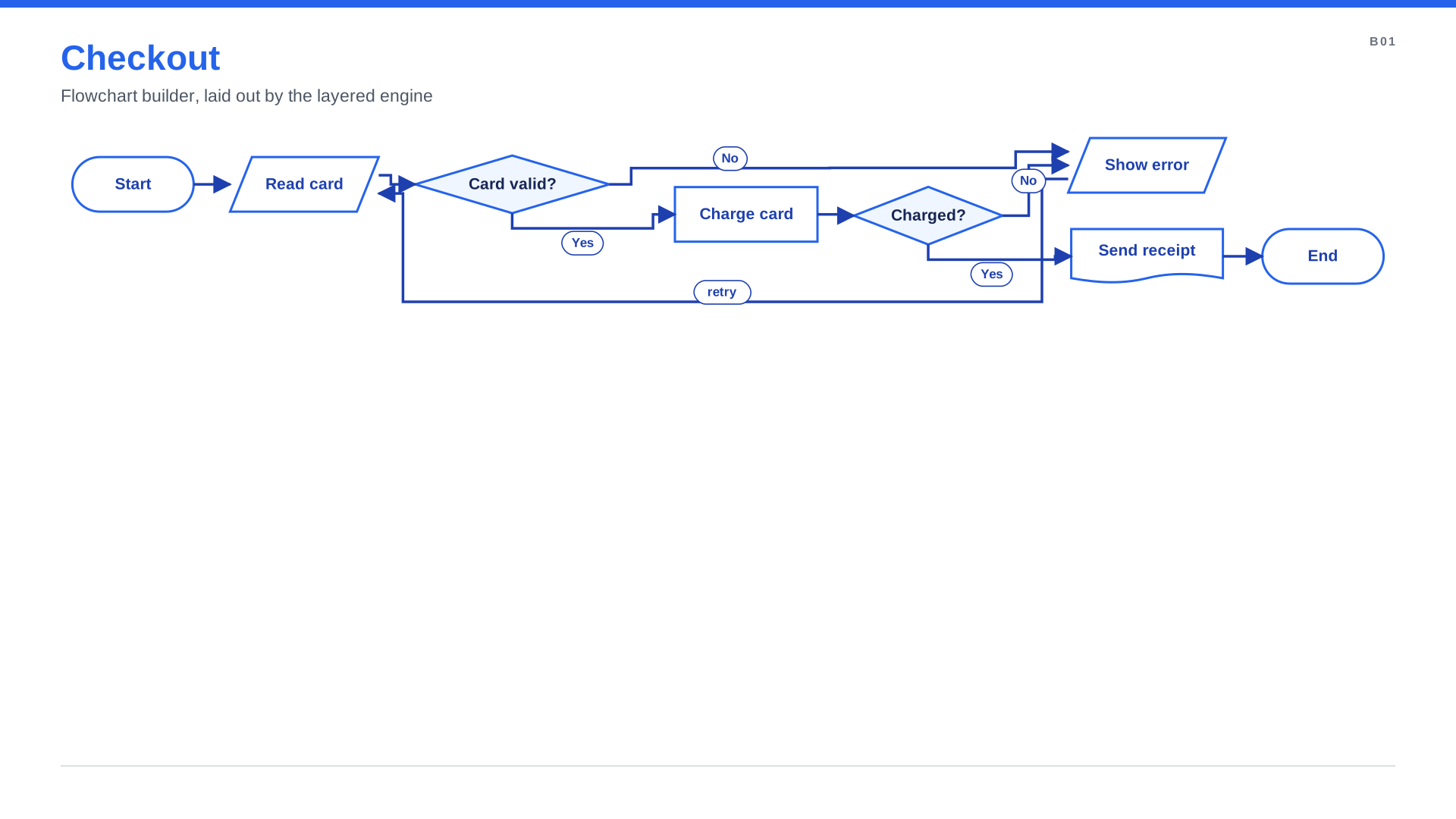
Flowchart
"""Flowchart: `spinagram render examples/behavior/flowchart.py -f svg,pptx -o out/`."""
from spinagram import Flowchart

fc = Flowchart("B01", "Checkout", subtitle="Flowchart builder, laid out by the layered engine",
               layout={"engine": "layered", "direction": "right", "rank_gap": 48},
               css="node::title { font-size: 21 }")  # a touch smaller so all eight steps fit one slide

start = fc.start()
card = fc.io("Read card")
valid = fc.decision("Card valid?")
charge = fc.process("Charge card")
paid = fc.decision("Charged?")
receipt = fc.document("Send receipt")
error = fc.io("Show error")

start >> card >> valid
valid.yes(charge) >> paid
valid.no(error)
paid.yes(receipt) >> fc.end()
paid.no(error)
error.to(card, "retry")

diagram = fc
| Verb | Symbol |
|---|---|
start(), end() | terminator |
process(title) | process |
decision(title) with .yes(x), .no(x), .to(x, "label") | decision |
io(title) | input/output parallelogram |
document(title), predefined(title), data(title) | document, predefined process, data store |
State machine
"""State machine: composite state, orthogonal regions, history, choice and self-transition."""
from spinagram import StateMachine

sm = StateMachine("B02", "Order lifecycle", subtitle="StateMachine builder", direction="right",
                  layout={"engine": "layered", "direction": "right", "rank_gap": 56},
                  css="state::title { font-size: 21 } state::body { font-size: 16 }")

created = sm.state("Created", entry="reserve stock")
paid = sm.state("Paid", do="notify warehouse")
cancelled = sm.state("Cancelled")
sm.initial >> created
created.on("pay", paid, guard="amount ok", action="capture")
created.on("cancel", cancelled)
paid.on("retry", paid)

with sm.composite("Fulfilment") as f:
    with f.region() as picking:
        pick = picking.state("Picking")
        picking.initial >> pick
    with f.region() as billing:
        bill = billing.state("Invoicing")
        billing.initial >> bill

paid.on("ship", pick)
done = sm.choice()
bill >> done
done.to(sm.final, "[delivered]")
done.to(cancelled, "[lost]")
cancelled >> sm.final

diagram = sm
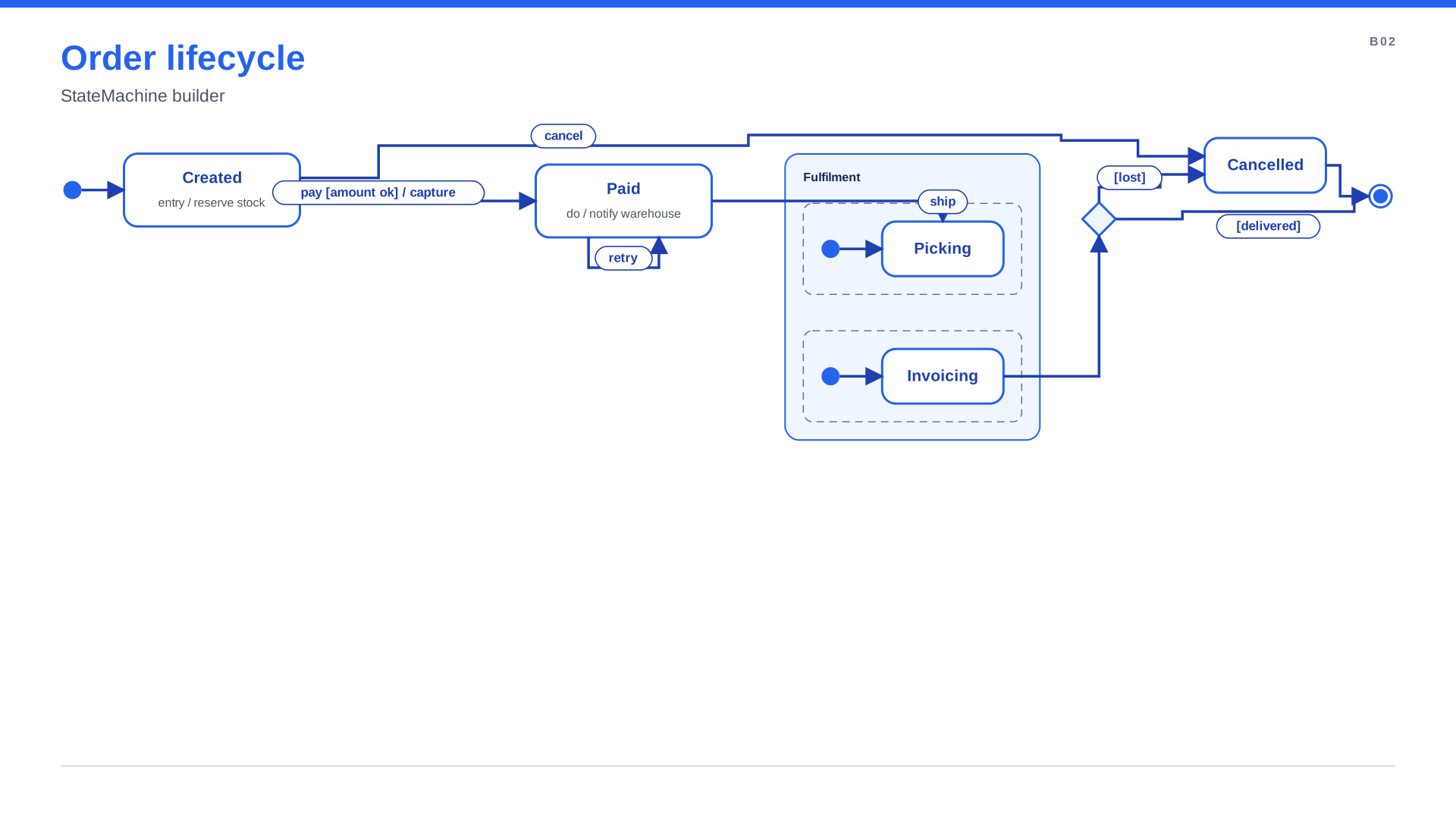
sm.state(title, entry=, do=, exit=)lists the state's activities.s.on(event, target, guard=, action=)labels the transitionevent [guard] / action; a transition to itself is drawn as a loop.sm.initialandsm.finalare one pseudostate per scope.with sm.composite(title) as c:nests substates;with c.region() as r:adds orthogonal regions (dashed boxes);c.history(deep=False)andsm.choice()add pseudostates.
Activity
"""Activity: swimlanes, a sequence and a parallel block (fork and join bars)."""
from spinagram import Activity

act = Activity("B03", "Order fulfilment", subtitle="Activity builder with swimlanes", direction="right",
               layout={"engine": "layered", "direction": "right", "rank_gap": 44})

with act.sequence():
    with act.lane("Customer"):
        act.start()
        act.action("Place order")
    with act.lane("Shop"):
        act.action("Check stock")
        with act.parallel() as par:
            with par.branch():
                act.action("Pick items")
                pack = act.action("Pack")
            with par.branch():
                act.action("Send invoice")
    with act.lane("Warehouse"):
        act.send("Ship parcel")
        act.end()

with act.lane("Shop"):
    slip = act.object("Packing slip")
pack >> slip

diagram = act
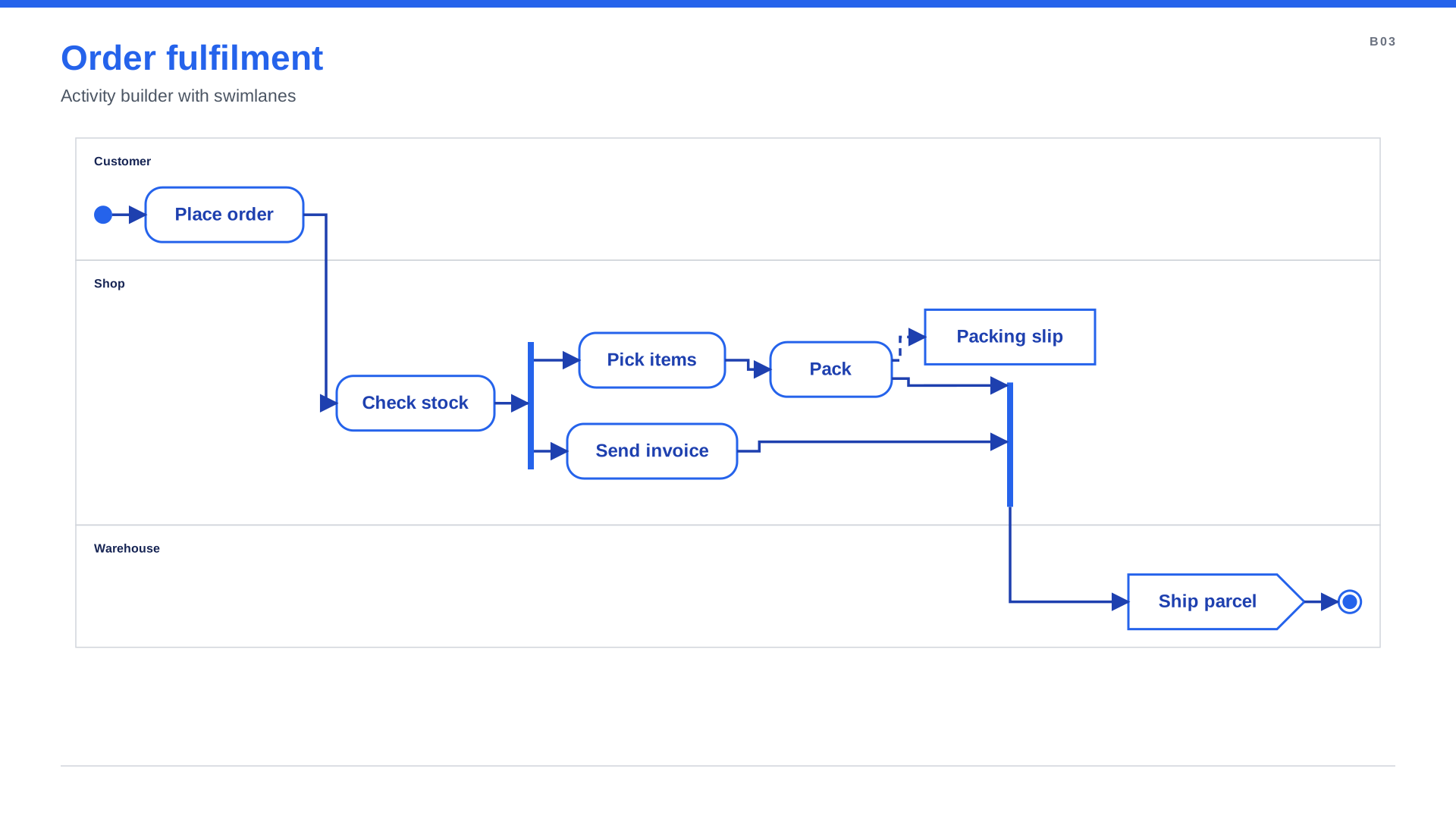
with act.lane("Shop"):puts the nodes created inside into that swimlane (re-entering reuses it).with act.sequence():connects nodes in creation order.with act.parallel() as p:+with p.branch():draws a fork bar, the branches and a join bar.action,decision,merge,start,end,flow_end,send,receive,object; edges to object nodes are dashed.
Several diagram types on one slide
Any diagram can embed typed regions. A region is a box laid out by its own engine (layered by
default, or layout={"engine": ..., "direction": ...}), connected to the rest with normal arrows.
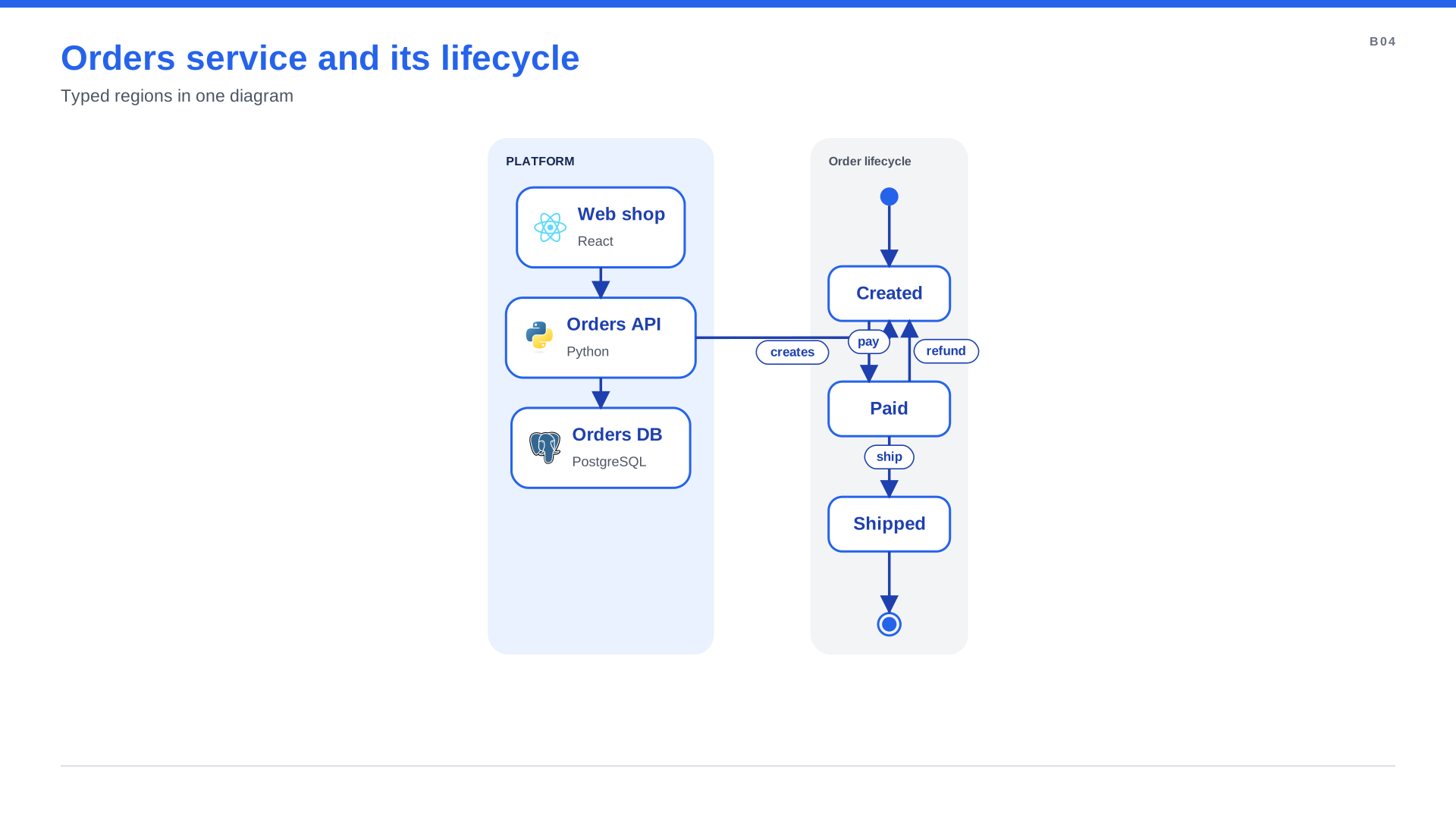
"""One slide, two diagram types: an architecture view and the state machine of one of its services."""
from spinagram import Diagram

d = Diagram("B04", "Orders service and its lifecycle", subtitle="Typed regions in one diagram")

with d.group("Platform", style="soft", direction="down"):
    web = d.box("Web shop", text="React", icon="terrastruct:react")
    api = d.box("Orders API", text="Python", icon="terrastruct:python")
    db = d.box("Orders DB", text="PostgreSQL", icon="terrastruct:postgres")
web >> api >> db

with d.state_machine("Order lifecycle", direction="down") as sm:
    created = sm.state("Created")
    paid = sm.state("Paid")
    shipped = sm.state("Shipped")
    sm.initial >> created
    created.on("pay", paid)
    paid.on("ship", shipped)
    paid.on("refund", created)
    shipped >> sm.final

api.to(created, "creates")

diagram = d
Checks
spinagram check reports decisions with fewer than two branches, forks with one branch and state
regions without an initial state. Edges out of a final node or into an initial node fail when the
diagram is built.