
Automatic layout
Leave out the coordinates; spinagram sizes and places everything.
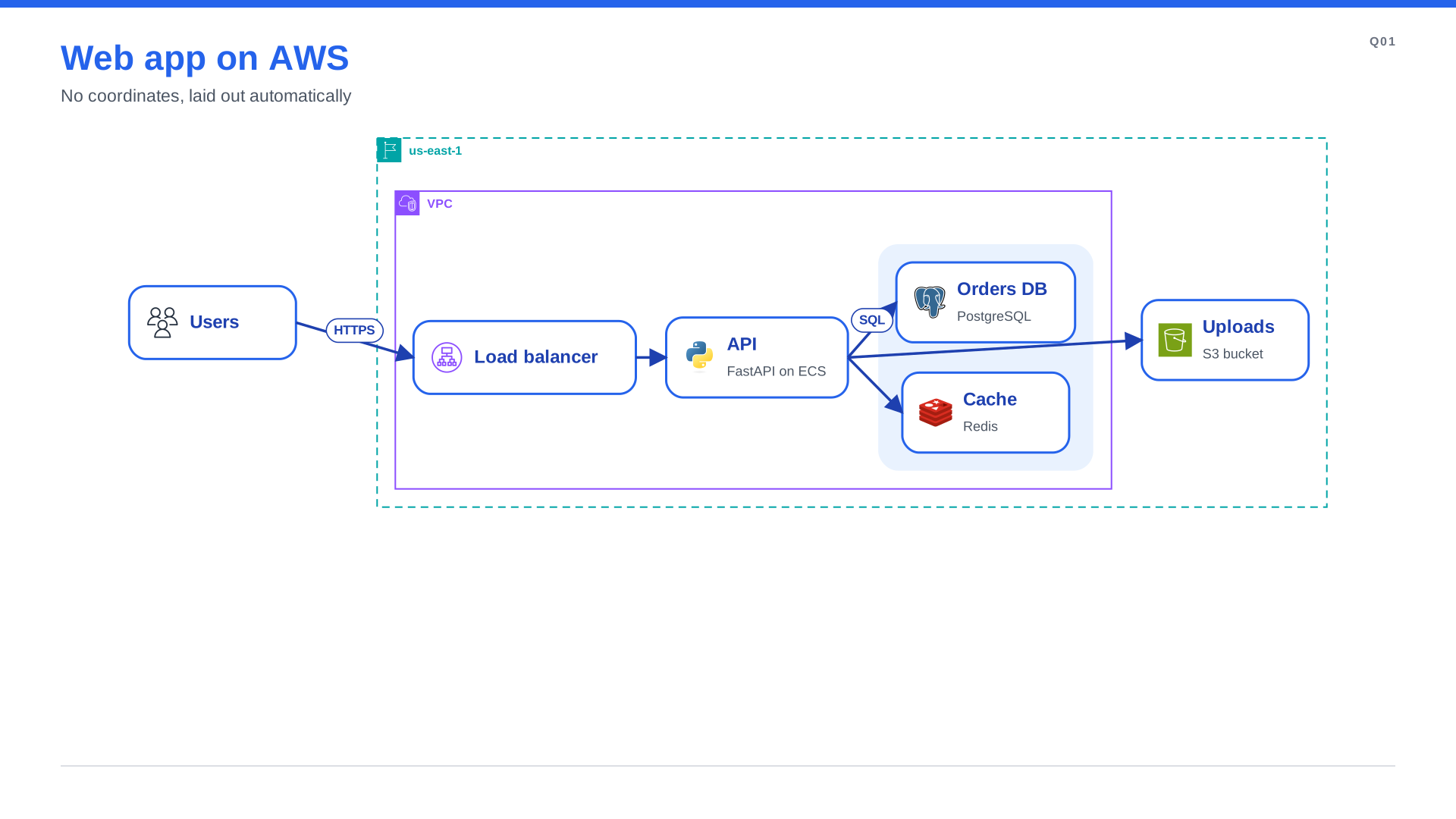
When no node has coordinates, spinagram sizes every node from its text and icon, places everything and draws each group as a zone with its label and corner icon.
"""Automatic layout: no coordinates. Run `python examples/quickstart.py`, or
`spinagram render examples/quickstart.py -f svg,png,pptx -o out/`."""
from spinagram import Diagram

d = Diagram("Q01", "Web app on AWS", subtitle="No coordinates, laid out automatically")

users = d.box("Users", icon="aws:users")
with d.group("us-east-1", style="aws-region", direction="right"):
    with d.group("VPC", style="aws-vpc", direction="right"):
        lb = d.box("Load balancer", icon="aws:alb")
        api = d.box("API", text="FastAPI on ECS", icon="terrastruct:python")
        with d.group():  # no style: a light "soft" zone
            db = d.box("Orders DB", text="PostgreSQL", icon="terrastruct:postgres")
            cache = d.box("Cache", text="Redis", icon="terrastruct:redis")
    s3 = d.box("Uploads", text="S3 bucket", icon="aws:s3")

users.to(lb, "HTTPS") >> api
api.to(db, "SQL")
api >> [cache, s3]

diagram = d  # lets `spinagram render` and `spinagram serve` pick it up

if __name__ == "__main__":
    d.save("out/", formats=["svg", "png", "pptx"])
Groups
In Python, nodes and groups created inside with d.group(...) become its children. In YAML, a group
lists children (node ids or nested groups), or a node names its group with in: <group-id>.
Any zone style works: soft, warning, alert, neutral, and the AWS Architecture styles
aws-cloud, aws-account, aws-region, aws-vpc, aws-az and aws-subnet. A group without a
style is drawn as a light soft zone, like the database and cache column above.
With the flex engine, a group takes direction (right or down), columns (grid), gap,
padding and align. A group of groups is a row by default; any other group is a column.
A larger example, Vault and Consul across three availability zones, is
examples/aws_layout.yaml.
Engines
layout picks the engine and the main flow. Without it, spinagram uses flex flowing right.
d = Diagram("L01", "Vault on AWS", layout={"engine": "elk", "direction": "down"})| Engine | Needs | Strengths |
|---|---|---|
flex (default for plain diagrams) | nothing (pure Python) | Nested rows, columns and grids. Deterministic. Edges are straight, or elbowed with route: ortho. |
layered | nothing (pure Python) | Ranked flows with orthogonal routes, loops round the side, self-loops, swimlanes. Default for flowcharts, state machines and activities. Deterministic. |
dot | Graphviz (dot on PATH) | Ranked flows. Clusters for groups. Orthogonal routes (splines=ortho). |
elk | bun or node; elkjs is installed into the cache on first use | Layered layout with edges routed across group borders. Orthogonal routes. |
d2 | d2 on PATH | D2's own layouts (options: {layout: elk|dagre|tala}). |
- Engine options:
layout.optionsis passed to the engine unchanged, as ELK properties or dot graph attributes. - Comparing engines:
--layout ENGINEonrender,check,factsandserve(orSPINAGRAM_LAYOUT) overrides the spec's engine.d.save(layout="elk")does the same in Python.
spinagram render examples/aws_layout.yaml --layout elk -o out/Mixing manual and automatic placement
With layout set, nodes with explicit x/y outside any group keep their position. Laid-out
content goes into layout.area: [x, y, w, h], which defaults to the canvas minus the margins and
chrome. Anything that does not fit is reported by spinagram check.
Edge routes
A route from the engine becomes the edge's via, bound to node sides. An edge you anchored
(api.right) or routed (via) is left alone.
Hand-tuning
Freeze the computed positions into an explicit YAML spec, then tune it by hand:
spinagram layout examples/quickstart.py -o frozen.yamlYour own engine
An engine is a class with name, available() and run(LGraph) -> LResult (see
spinagram.autolayout.graph), registered through the spinagram.layouts entry point. See
Extending.